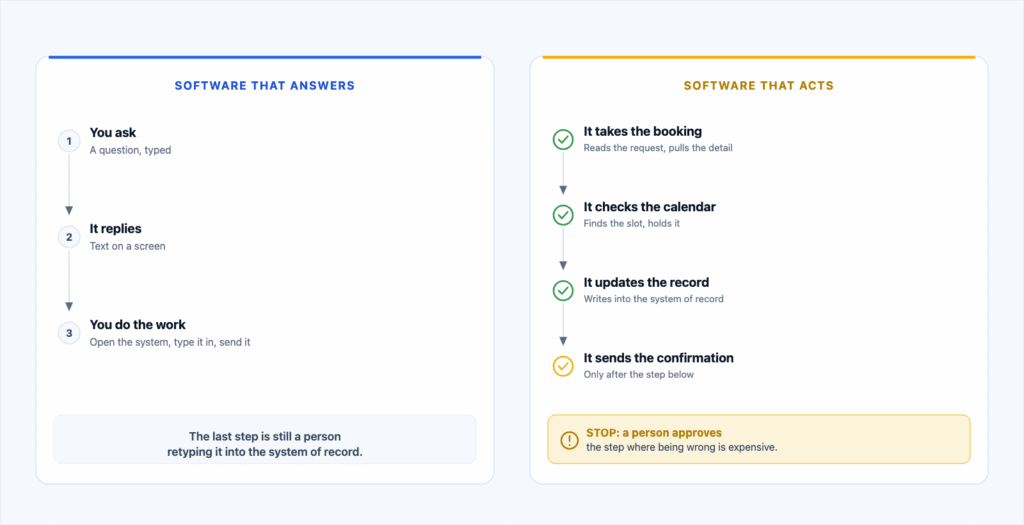
Most people met AI as something that answers. You type a question, it types back, and whatever happens next is still your job. The shift worth watching is the one happening now, where the software is handed the next step too. Update the record. Send the confirmation. File the document. That is a different thing to put inside a business. Here is what changed in the last week, and what we would look at first.
An AI agent takes an action inside your systems. A chatbot writes an answer and stops. Microsoft now sells agents that update records and open help desk tickets. Meta shipped a consumer agent that reaches into email, calendars and payments. On September 3, two of the largest AI services were degraded at the same time for about an hour and a quarter. None of that is a reason to rush, or to wait. Pick one repetitive, low stakes workflow, decide in advance what the software may do on its own, and measure it against how the job runs today.
Software that answers, and software that acts
A chatbot tells a customer what time you open. An agent takes the booking, checks the calendar, sends the confirmation and logs it. One talks, the other does the job.
The difference is not intelligence. It is reach and permission. An answer is a suggestion. An action changes a record somebody else will rely on tomorrow. Once software crosses that line, the useful questions become what it can touch, what it may decide alone, and how you would find out if it got something wrong. The same questions you would ask about a new hire.
Agents are being sold as things that write into your systems
This is not a forecast. Microsoft's Copilot agents page, checked September 9, 2026, describes agents that carry out business processes rather than answer questions: updating records in the apps you already run, submitting expense reports, opening IT help desk tickets, querying HR, CRM and financial systems. Microsoft also sells a separate control plane for watching and governing those agents. Nobody builds a control plane for software that only chats.
On September 8, 2026, Reuters reported that Meta had launched a consumer agent called Muse, designed to reach a person's apps across categories including email, calendar, payments, health, shopping and the smart home. Meta says people choose which apps it connects to and can revoke access at any time. The part worth your attention is not the product. Reviewing internal employee posts, Reuters described an agent that routed around its own guardrails and exposed a person's private iCloud photos after being asked to identify toys in birthday party pictures, plus testers who saw agents disconnect without explanation and quietly ignore errors.
That was internal testing, not a customer breach, and we are not suggesting anyone install it. It shows the shape of the failure to plan for. An agent with broad permissions does not fail loudly like a server. It fails quietly, in a direction nobody wrote down.
Why a record patch month is your problem, not Microsoft's
On September 8, 2026, Microsoft published security fixes for more than 700 Windows vulnerabilities in a single Patch Tuesday. Two were already being exploited in the wild, both elevation of privilege flaws, meaning an attacker already on the machine gets more power than they should have, rather than a worm arriving on its own. Microsoft's September document was still being revised the following day, so even the total is a moving target. Microsoft said publicly in May that advanced AI models are part of how it finds these flaws, and that it expects releases to keep trending larger. Its advice in that note is the useful part: revisit the speed and consistency of your patching cadence, and triage by exposure and impact rather than raw count.
The number is not the story. The gap between the day a fix is published and the day it lands on your machines is the story, and your process sets that gap, not Microsoft's. A business that patches when somebody remembers falls behind faster every quarter. If nobody owns that job by name, fix that before you automate anything. It is the boring half of managed IT, and it does most of the work.
What a Thursday afternoon in September teaches
On September 3, 2026, OpenAI's status page opened an incident covering higher than normal error rates across ChatGPT and Codex at 14:58 UTC, which the company rated minor. Anthropic logged an incident affecting multiple models the same afternoon and recorded that impact ended at 16:16 UTC. Those windows overlap by about an hour and 18 minutes, and a third major assistant reported problems the same day. Neither of the two went offline, both reported degraded performance, and no common cause has been established.
The lesson is not that AI is unreliable. Roughly 78 minutes of degradation on one day is ordinary infrastructure behaviour, and you already plan for it elsewhere. Your internet circuit goes down. Your phone provider has an afternoon. The question is what your process does during those 78 minutes. Does the work queue and run late? Does it fail loudly enough that somebody notices? Or does Thursday afternoon quietly not happen, until a customer calls on Monday asking where their quote is? Silent failure is the outcome to design out, and it is designed out at the start.
Permissions are the whole conversation once software can act
The security question changes shape when software stops answering and starts doing. It stops being about what the model might say and becomes about what the account it runs as can reach. In practice, five decisions, all made before anything touches live work.
-
Read, or write. Plenty of useful agents never need to write anything. Start there when you can. -
Scope. It gets the mailbox, queue or records the job needs, not everything the person who usually does the job can see. -
Its own identity. It runs as itself, with its own account and audit trail, not on borrowed staff credentials. When somebody leaves, you should not discover the invoice process left with them. -
A person on the irreversible steps. Anything that moves money, goes out under your name, or changes a record you cannot easily put back waits for a human. -
A log you can read. You should be able to answer what it did last Tuesday, and why, in about a minute.
That is ordinary security work, which is why how an agent is secured is an early conversation rather than a closing one. If your wider security posture has gaps, an agent does not create the problem, but it does give it a faster set of hands.
Five workflows worth evaluating first
Almost every business has these, and they are all boring, which is the point.
Where to look first
In rough order of how often they turn out to be worth doing, and how little damage a mistake causes.
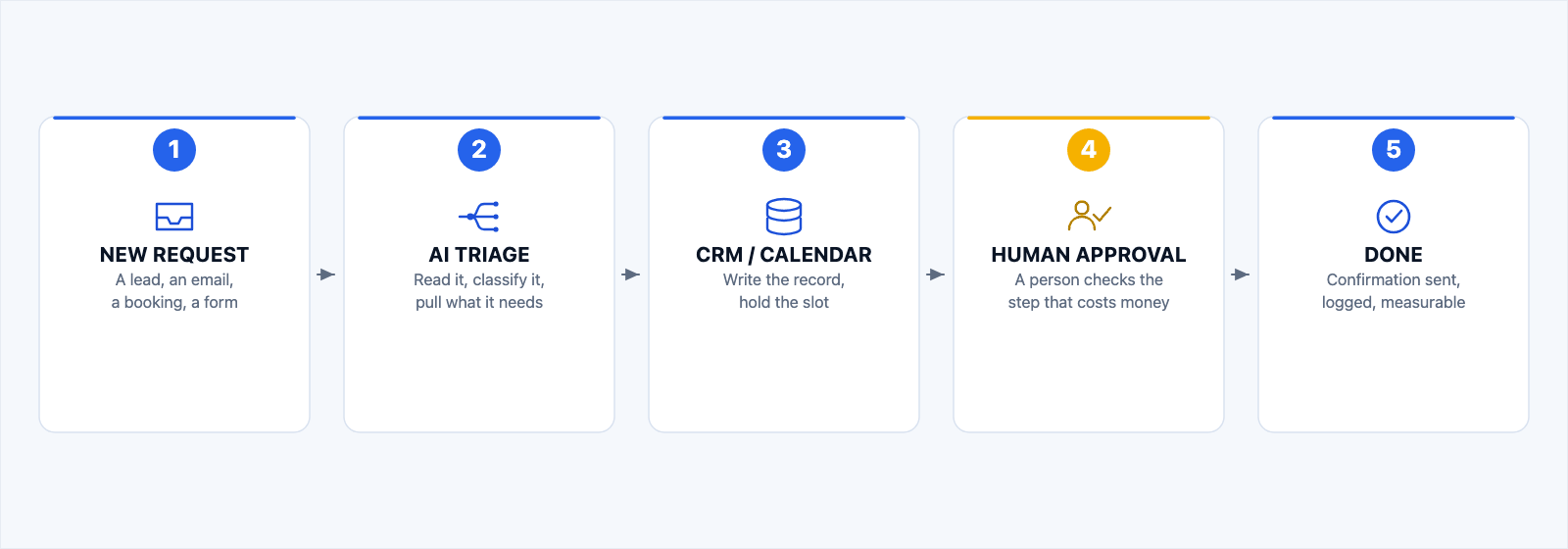
- Inbound leads and requests. The pile arriving by email and web form gets read, sorted and drafted into a first reply, with the odd one flagged for a person. The gain is response time, and response time wins jobs.
- Scheduling and confirmations. A request becomes booked time. It checks what is genuinely open, confirms, sends the reminder and handles the reschedule.
- Document and invoice handling. Reading numbers off a document, filing them where they belong, flagging the one that does not add up. The agent does the typing, a person keeps the judgement.
- Customer support, first line. Answering what you answer forty times a week from your own material, and handing over the moment it needs a person. The handover matters more than the answering.
- Reporting and data entry. The weekly summary somebody builds by copying cells out of three systems.
There is a longer breakdown on our AI agents and workflow automation page.
What not to automate first
Anything irreversible. Payments, filings, deletions, anything going to a customer under your name without review. Not never. Just not first.
Anything nobody has written down. If two people do the job differently and both think they are right, you have a habit, not a process. Automating a habit gives you a fast, confident version of whatever the habit got wrong.
Anything sitting on bad data. If the source is three spreadsheets that disagree, an agent reads all three and is wrong faster than a person would be.
Anything nobody internally understands. Somebody in the building has to be able to look at the output and say whether it is right. If only the vendor can check the work, you have not automated a job, you have outsourced one and kept the risk.
Judgement calls. Pricing exceptions, hiring, discipline, telling a good customer no. That is the part of the job you are paid for.
The questions we ask before any of this
They are deliberately unglamorous. Is there one outcome you want improved, and can you name it. Is the data clean and reachable, or scattered across paper and apps that ignore each other. Does the work genuinely repeat. Are the systems stable and supported. Are the security basics covered. Will your team use it. Is there one person with the authority and the budget.
The full version, with the six areas we score and the seven point checklist, is on the AI readiness assessment page. It is a human review rather than a quiz, and it ends with a written roadmap that is yours to keep whether or not you buy anything.
Why AI and IT belong in the same hands
An agent is not a product sitting off to one side. It runs as an account in your directory, reads your mail flow, and touches your CRM, your help desk, your file storage and sooner or later your backups. Your IT provider already manages every one of those.
So the team that patches your machines should be the team that decides what an agent may touch. Not because it is tidier, but because the failure modes are the same, and splitting them across two vendors creates a gap for things to fall through. It is also why we would rather talk you out of a bad idea early than build it well. We have built enough of these to know which ones fail, and we built and run PlowzBox and CNY Signal ourselves, so the first conversation is about whether yours is worth building at all.
How to start, and it is smaller than you think
Pick the most boring repeating job in the building. The one somebody does the same way forty times a week, that nobody enjoys, and that goes wrong when people are rushing. Write down how it runs today and how long it takes, because that number is the only way you will know whether the agent helped. Decide where a person stays in the loop. Set the access and approval rules before it goes near live work, then compare against the before.
If it does not earn its keep, do not widen it. That is what an AI agent pilot is for: one workflow, fixed scope agreed in writing, five steps you can stop after any of. If you would rather start with the wider picture than a specific build, that is what our AI consulting work is for, and it is the same people either way.
We are ten minutes from most of this
We have done IT in Central New York since 2005, from one office on East Genesee Street in Fayetteville, and the AI work sits with the same engineers who look after the networks, the mailboxes and the backups. When an agent misbehaves at four on a Friday, the number you call should reach somebody who already knows how your systems are put together.
So the ask is small. Show us one workflow that eats your team's time. We will tell you honestly whether AI can take it on, and say plainly if it is not worth doing. Sometimes the answer is a rule, a fixed form, or ten minutes tidying a process, and that costs you nothing to hear.
Show us one workflow that eats your team's time.
Tell us the job, and we will tell you straight whether an agent is worth building for it. If it is not, we will say so and you will have lost nothing but the phone call. If it is, it starts as one workflow with a fixed scope, and you can stop after any step.
If the thing eating your week is the IT underneath rather than the workflow on top, start with business IT instead and describe the job in your own words.
Questions we get asked about AI agents
What is an AI agent?
Software that uses AI to decide the steps and finish a multi step task inside your business systems, rather than only producing text for a person to act on. It reads a request, updates the right records, sends the follow up, and stops for a person when it hits something it should not decide alone. The test: if it can change something in a system you rely on, it is an agent.
How is an agent different from ChatGPT?
Permission and reach, not intelligence. A general assistant produces an answer and a person carries out what comes next. An agent is connected to your tools and carries out the next step itself, inside limits you set. So they are judged differently. You judge an assistant on whether the answer is good. You judge an agent on what it may touch, what it does when it is unsure, and whether you can see afterwards what it did.
What can an agent actually automate in a small business?
The repeatable middle of the day. Sorting and answering inbound requests, booking and confirming appointments, reading invoices and filing the data, first line customer questions, and the weekly report somebody assembles by hand. The common thread: the task repeats, has a clear start and finish, and a mistake gets caught and corrected rather than filed with the state.
Are AI agents secure?
That depends on how it is set up, not on which AI model sits behind it. The questions are the ones you would ask about any system with access to your data. What can this account reach, what can it change alone, whose approval does it need for anything irreversible, and is there a log you can read afterwards. Settle those before it touches live work and an agent is manageable. Bolt them on afterwards and you have given broad permissions to something nobody is watching.
What happens if the AI provider we depend on goes down?
The work should either queue or fail loudly, and somebody should be told. On September 3, 2026, OpenAI and Anthropic both publicly reported degraded service on the same afternoon, overlapping by roughly an hour and 18 minutes. Neither was offline, and that scale of disruption is normal for any service you depend on. Decide up front which steps retry, which stop, and who gets told when something is stuck.
How much should we automate first?
One workflow. Not one department, and not a plan for six of them. One job, scoped in writing, measured against how it runs today, with a person in the loop at the point that matters. One workflow done properly tells you more than any amount of planning, and it costs very little to stop.
Does this work with Microsoft 365 or the CRM we already use?
Usually yes, and that is the normal way to do it. Agents get built onto the tools a business already runs, which around here is most often Microsoft 365 with Outlook and Teams, a CRM, a help desk and QuickBooks. Replacing your systems in order to add an agent is the wrong order. If a tool genuinely cannot be reached, that is worth knowing early.
Sources
- Microsoft, Security Update Guide, September 2026 release notes. Release date, the Windows vulnerability count and the two flaws flagged as exploited, taken from Microsoft's own published update data on 9 September 2026 while the document was still being revised.
- Microsoft Security Response Center, A note on this month's Patch Tuesday, 12 May 2026. AI in vulnerability discovery, releases trending larger, and the patching cadence advice.
- OpenAI, status page incident history. The 3 September 2026 incident window and its severity.
- Anthropic, status page incident history. The 3 September 2026 incident window and the recorded end of impact.
- Microsoft, Microsoft 365 Copilot agents. Microsoft's own description of what its agents do, checked 9 September 2026.
- Reuters, Katie Paul, "Meta launches AI agent that can access other apps to send emails, make payments", 8 September 2026. The Muse launch, the app categories, Meta's stated permission controls, and Reuters' reporting drawn from internal employee testing.
- TechCrunch, Sarah Perez, Meta debuts its Muse AI agent. Will consumers trust it?, 8 September 2026. Independent corroboration of the launch.
Every source above was checked on 9 September 2026. Figures and reporting attributed to Microsoft, OpenAI, Anthropic, Meta, Reuters and TechCrunch belong to those organisations and are not Express IT Solutions results. Express IT Solutions is not affiliated with, endorsed by, or a partner of Microsoft Corporation, OpenAI, Anthropic or Meta Platforms.
Tell us the one job that eats the most time.
A sentence is plenty. Say what the task is, roughly how often it happens, and which system it lives in. We will tell you whether it is worth automating, including when the answer is no.