
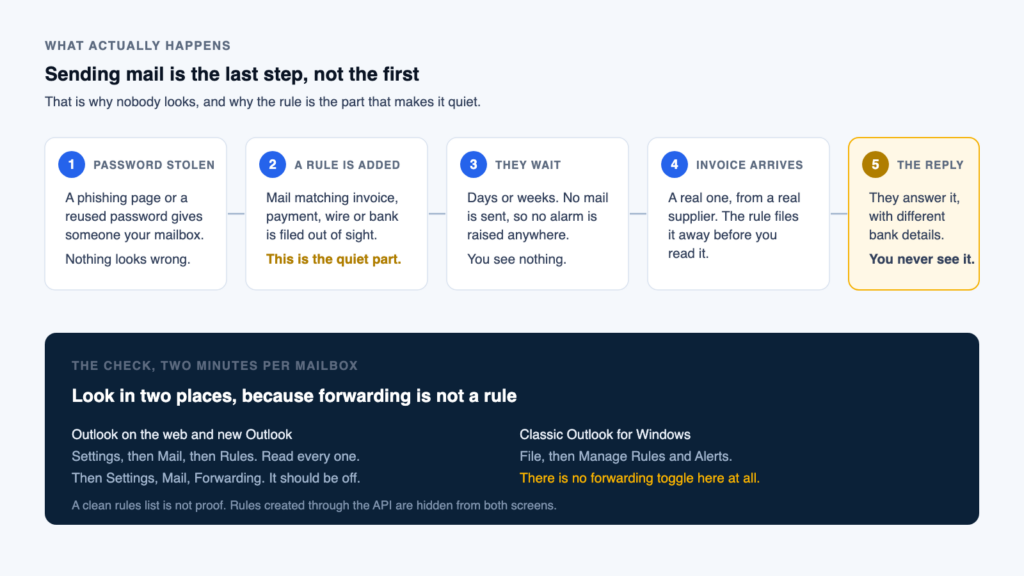
When somebody steals the password to an office email account, the first thing they do is usually not send an email. It is create a rule. The rule quietly files a particular kind of message into a folder nobody opens, and then the attacker waits and reads. This is the single most useful five minute check an office manager in Central New York can run this month, and you do not need an IT person to run it.
A stolen mailbox password is rarely used to send mail straight away. It is used to hide mail. In Outlook, open Settings, then Mail, then Rules, and Settings, then Mail, then Forwarding. If there is a rule or a forward that nobody in your office set up, treat it as a live break in, not a quirk. Delete it, change the password, sign every session out, and check whether any payment details changed while it was running. This is specific to Microsoft 365 and Outlook, though the same trick exists in Google Workspace.
Why an inbox rule, and not a phishing email
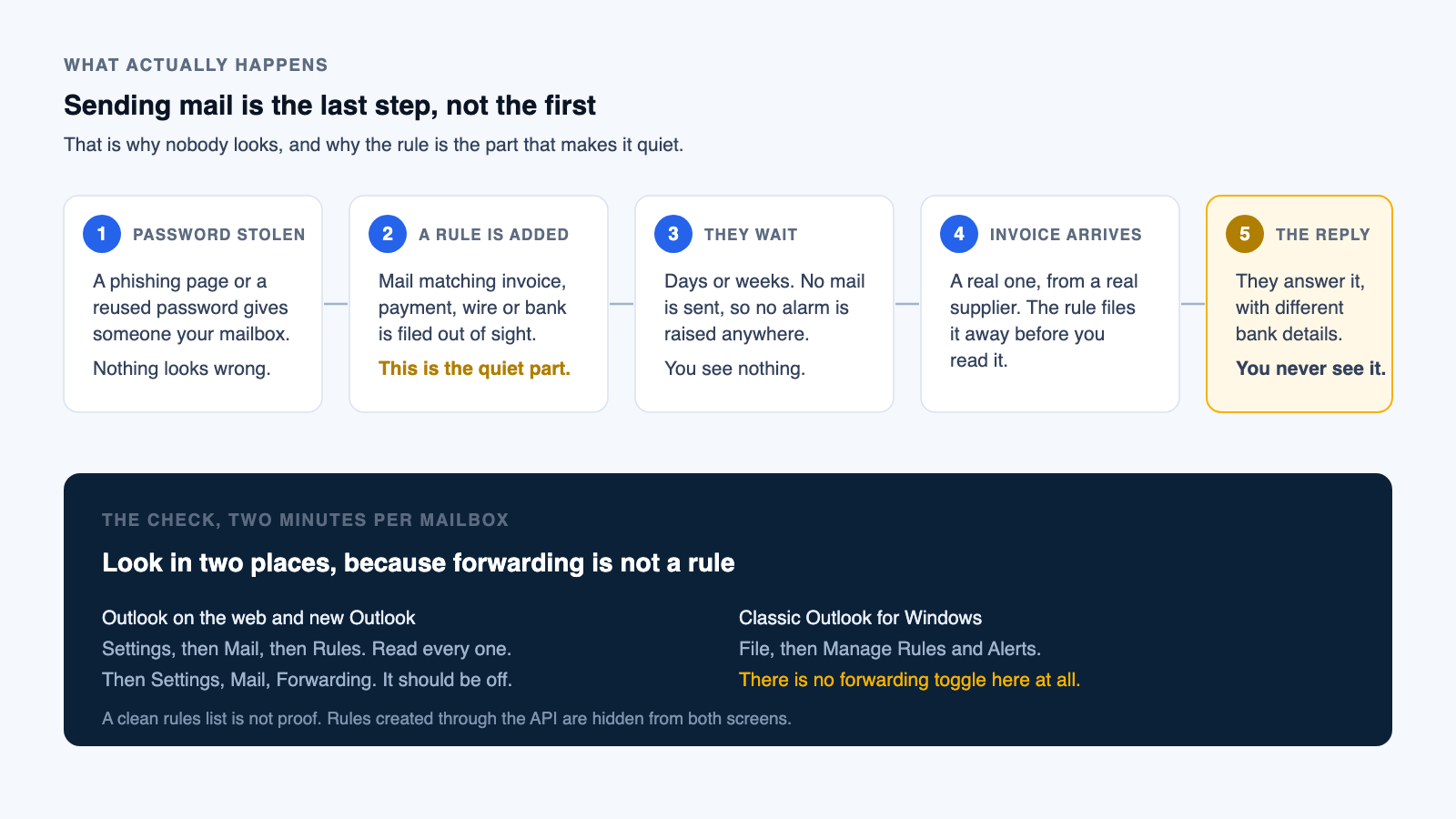
Business email compromise is not a technically exotic attack. It is a patient one. Someone gets a password, usually through a fake sign in page, then logs in and behaves like a well mannered guest. Sending mail from a compromised account gets noticed within a day. Reading mail gets noticed by nobody.
The attacker's problem is the moment they finally intervene in a real conversation, because the genuine account owner will see that reply sitting in the thread and the whole thing collapses in about ninety seconds. An inbox rule solves it. The rule takes the messages that matter, moves them somewhere the owner never looks, and often marks them as read so no unread count gives the game away. Microsoft's own guidance for security teams describes this pattern precisely. In several incidents CISA investigated, attackers went one better and edited a rule the user had legitimately created themselves, so the list still looked familiar at a glance while the destination address had been quietly swapped.
Then they wait. When a real invoice finally arrives, they answer it with different bank details from inside a thread that looks entirely normal at the other end, and the account owner never sees the exchange.
It works often enough to be the second most costly category of internet crime the FBI tracks. In its 2025 Internet Crime Report, the FBI's Internet Crime Complaint Center recorded 24,768 business email compromise complaints and 3,046,598,558 dollars in losses for the year, up from 2,770,151,146 dollars the year before. Those are industry figures for the United States as a whole, published by the FBI, not Express IT numbers.
Check it yourself, in about five minutes
You do not need administrator rights to check your own mailbox, and you should check every mailbox in the office, not only the ones that handle money. The bookkeeper is the target, but reception is often the way in. Law firms moving closing funds see this exact attack, real estate and trust work most of all; the firm side of defending against it is covered on our law firm IT support page. Outlook has two quite different interfaces in circulation, so find the one you actually use.
Outlook on the web, and new Outlook for Windows
This is the version you get in a browser at outlook.office.com, and the version Microsoft has been rolling onto Windows PCs. The gear icon sits at the top right.
- Open Settings, the gear icon at the top right of the window.
- Go to Mail, then Rules and read the list. Every rule on the mailbox appears here, with its conditions and its actions.
- Read each rule, including the ones that look boring. You are checking that a human in your office deliberately created every single one.
- To remove a rule you do not recognise, select the trash can icon next to it. Before you delete it, photograph the screen or write down exactly what it said, because you will want that later.
- Now go to Mail, then Forwarding and check it too. Forwarding is a separate setting rather than a rule, so it never appears in the rules list at all.
- If forwarding is switched on and points at an address nobody in the office recognises, that is the finding. Turn it off and select Save.
Classic Outlook for Windows
The long standing desktop application, the one with the File menu in the top left corner. If your ribbon says File, this is you.
- Select File, then Manage Rules & Alerts to open the dialog. On some builds the same dialog opens from the Home tab, under Rules.
- Stay on the Email Rules tab. Read every rule listed, and note that the checkbox beside a rule only controls whether it is running, not whether it exists.
- Select a rule to see its conditions and actions spelled out in the description panel underneath.
- To remove one, tick the box next to it, then choose Delete and confirm with OK. Record what it said first.
- Check the Run Rules Now and Options buttons too, because a rule can be present, disabled, and re enabled later by anyone who still has the password.
Do the same on every mailbox, including shared mailboxes, which people forget because nobody signs into them directly.
What a malicious rule actually looks like
You are not looking for something labelled suspicious. You are looking for something unremarkable that nobody in your office remembers making. Microsoft's investigation playbook lists the shapes these rules take, and they are consistent enough to recognise on sight.
- It filters on money words. Invoice, payment, wire, remittance, bank, ACH, statement. A rule that acts only on the messages that move money was not written for convenience.
- The destination is somewhere nobody goes. RSS Feeds, RSS Subscriptions, Notes, Junk Email, Conversation History, Archive, or a folder with a blank or single character name. Microsoft names the RSS folder specifically, and CISA documented attackers using exactly that folder to keep warnings out of sight.
- It marks messages as read. A rule that both moves a message and marks it read exists to stop you noticing. Almost no genuine filing workflow needs that.
- It deletes everything. A rule deleting all incoming mail with no keyword filter is, in Microsoft's words, mostly an indicator of malicious activity.
- It forwards or redirects outside your domain. Any address that is not one of yours needs an explanation. Look hard at near misses, the domain that is your company name with one letter changed.
- The name is blank, a full stop, or a single letter. Attackers name rules to be skipped over, so a rule called "." or "a" deserves more of your attention, not less.
The Rules screen in Outlook does not show you everything. Rules created through Exchange Web Services or the Microsoft Graph API can be hidden from both Outlook interfaces entirely, and separately there is mailbox level SMTP forwarding, which is a property of the mailbox rather than a rule and therefore never appears in the rules list under any circumstances. A clean rules list is good news, not proof.
Whoever administers your Microsoft 365 tenant can settle it properly from Exchange Online PowerShell. Microsoft's own compromised account guidance gives these two commands, and they take about a minute each.
Get-InboxRule -Mailbox you@yourcompany.com -IncludeHidden |
  Format-List Name,Enabled,RedirectTo,Forward*,Identity

Get-Mailbox -Identity you@yourcompany.com |
  Format-List Forwarding*Address,DeliverTo*
The first reveals hidden rules along with the visible ones. In the second, a value in ForwardingSmtpAddress means mail is going to an outside address, and DeliverToMailboxAndForward set to true means it is being both delivered and copied away, which is the configuration you are least likely to notice.
Do these in this order, today
Deleting the rule is the obvious step and it is also the least important one. Whoever created it still has the password, and can create another one this afternoon.
- Write down what the rule said before you delete it. Name, conditions, actions, destination folder, any forwarding address. You will need it for the bank, for your insurer, and for anyone who investigates.
- Delete the rule, and clear any forwarding on the mailbox, using the steps above.
- Change the password. Not a variation of the old one. If your accounts sync from an on premises server, Microsoft advises resetting there and resetting twice.
- Sign out every session. This is the step people skip, and skipping it means the attacker keeps working from a session that is already open. In the Microsoft 365 admin center go to Users, then Active users, select the person, then on the Account tab select Sign out of all sessions. In the Microsoft Entra admin center it is Users, then All users, select the person, then Revoke sessions on their Overview page.
- Turn on multi factor authentication for that account if it is not already on, and check the registered methods afterwards. An attacker who had the account long enough may have added a phone number or an authenticator of their own, which survives a password change.
- Check what moved while the rule was running. Open the destination folder. Read what is in it. Then contact by telephone, on a number you already had, anyone whose payment details changed in the last few months.
- If money has already gone out, call the bank first, not us. The FBI's advice is to contact the originating financial institution as soon as the fraud is recognised and request a recall or reversal, then file at ic3.gov with the full banking detail. Speed is the whole game on a wire recall.
How to tell whether this already happened
A rule you delete today may have been created eight months ago. Two checks will tell you.
Anyone can check their own account for sign ins they do not recognise at mysignins.microsoft.com. You are looking for sign ins from countries or devices that make no sense for that person.
The stronger answer is the audit log, which needs administrator access. In the Microsoft Purview portal at purview.microsoft.com, open the Audit solution card, set your date range on the Search page, and put these four operation names into the Activities, operations names field, exactly as spelled, separated by commas.
New-InboxRule,Set-InboxRule,UpdateInboxRules,Set-MailboxThat returns every rule creation, rule change and mailbox setting change in the window, with the date, the account and the IP address that did it. Note the limit before you rely on it. Microsoft retains these records for 180 days on standard licensing, and for a year on E5 licensing, so the window closes. It is also worth confirming your organisation has audit logging switched on before you need it, rather than after.
Stopping it being possible
Three things do most of the work, and none of them is a product you have to buy from anybody.
First, multi factor authentication on every mailbox without exception. The rule is downstream of a stolen password, and this is what makes a stolen password insufficient on its own.
Second, restrict automatic forwarding to outside addresses across the whole organisation, so no single mailbox can quietly start copying everything to a stranger. CISA is blunt about this. Routinely review user created email forwarding rules and alerts, or restrict forwarding, and consider preventing users from forwarding to accounts outside your domain altogether.
Third, and this is the one that saves the money rather than the mailbox, make it a written rule of your business that any change to bank details is confirmed by telephone, on a number you already held before the request arrived, never on a number supplied in the message asking for the change. That single habit defeats this whole category of fraud even when everything else has failed, which is why it belongs on a card by the desk of whoever pays the bills.
Questions we get asked about this
Does this only affect Microsoft 365 and Outlook?
No, but the click paths in this article are specific to Microsoft 365 and Outlook, because that is what most Central New York offices run. The same attack works in Google Workspace, where you would check Gmail settings under Filters and Blocked Addresses, and under Forwarding and POP IMAP. The principle is identical in any email system that lets a rule move or forward mail automatically.
I am not an administrator. Can I still run this check?
Yes. Checking Rules and Forwarding on your own mailbox needs no special permission at all, and neither does reviewing your own recent sign ins. The parts that need an administrator are the hidden rule check in Exchange Online PowerShell, the audit log search, signing sessions out, and restricting forwarding across the whole organisation.
Why would an attacker sit on a mailbox for weeks instead of acting immediately?
Because the value is in the timing, not the access. Reading the correspondence tells them who approves payments, how your invoices are worded, which suppliers are mid project and when a large payment is genuinely due. An intervention that matches a real conversation already in progress is far harder to spot than an invented request out of the blue, so they wait for one.
We already have multi factor authentication. Are we safe from this?
You are substantially safer and you should absolutely keep it on, but it is not a reason to skip the check. Attackers do get past it, by stealing the session token rather than the password, or by adding their own authentication method once inside. Multi factor authentication changes the odds. It does not close the question, and the check takes five minutes.
We found a rule and deleted it. Is that the end of it?
No. Deleting the rule removes the symptom and leaves the cause, because whoever made it still has the credentials and can make another one. The password change, the session sign out and the review of what moved while the rule was running are the steps that actually end it. Work through the seven steps in this article in order, and do not stop at the first one. A hidden inbox rule is also one of the 11 IT problems we keep finding in small business environments.
If you have found something and you want a second pair of eyes on it today
Our phone line answers 24 hours a day, 7 days a week, and it reaches somebody who can actually help rather than a message service. If you have just found a rule you cannot explain, that is the faster route. We have been doing this from one office in Fayetteville since 2005.
Prefer to have this checked properly across every mailbox rather than one at a time? That is part of what we do on managed IT, and we check it on every mailbox we manage.
Sources
- FBI Internet Crime Complaint Center, 2025 Internet Crime Report. The complaint and loss figures.
- FBI Internet Crime Complaint Center, Business Email Compromise. What to do after a fraudulent payment.
- CISA, Analysis Report AR21-013A. Modified and newly created forwarding rules, and the forwarding recommendations.
- Microsoft, Respond to a compromised email account in Microsoft 365. Hidden rules, mailbox forwarding properties, password and session guidance.
- Microsoft, Alert classification for suspicious inbox manipulation rules. The malicious rule patterns.
- Microsoft, Manage email messages by using rules in Outlook. The Rules click paths.
- Microsoft, Prevent user sign in and block access to Microsoft 365. The Sign out of all sessions path.
- Microsoft, Revoke user access in an emergency in Microsoft Entra ID. The Revoke sessions path.
- Microsoft, Search the audit log. The Audit search path, the operations names field and the retention limits.
Every click path here was checked against Microsoft's current documentation on 16 August 2026. Microsoft moves the Outlook interface around, so if a menu has shifted, search for the setting name. Figures attributed to the FBI and CISA are industry figures published by those agencies and are not Express IT results. Express IT Solutions is not affiliated with, endorsed by, or a partner of Microsoft Corporation.
Not sure what you are looking at? Send us the detail.
Tell us what the rule said, which mailbox it was on, and roughly when you think it appeared. If something has already been paid to the wrong account, say so and call the number above as well, because that one is time critical.