An AI acceptable use policy is a short written rule set for how your staff may use tools like ChatGPT, Copilot and AI agents at work. For a small business it has to settle five things: which tools are approved, what may be pasted where, who checks the output, who owns it, and what happens when something goes wrong.
One page is enough. Below: what each section should say, a table for what data may go where, and a one-page starting template you can copy.
Last reviewed November 24, 2026 by the Express IT Solutions team.
Why does a small business need an AI policy?
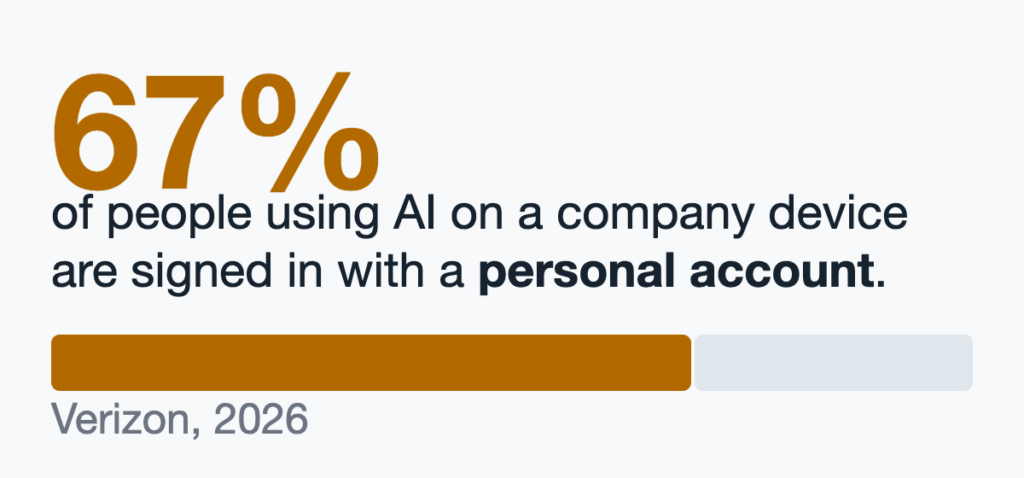
Because your staff are already using AI, whether or not you issued it. In its 2026 Data Breach Investigations Report, published May 19, 2026, Verizon found that 67 percent of users reaching AI services on a corporate device were signed in with a non-corporate account. That is an industry figure, not an Express IT Solutions result.
A personal account means the business has no contract with the vendor, no admin console, no record of what was pasted, and nothing to switch off when that person leaves. That is shadow AI: AI tools used for work that nobody approved and nobody is watching. It is rarely malice. It is someone trying to get a proposal out by five. A policy moves that work onto tools you chose, under accounts you control.
Should we block ChatGPT at work?
Usually not as a blanket rule. A blanket ban on AI chatbots usually fails, because the work moves to personal phones where you have no visibility at all. What holds up is a short written policy, approved tools good enough that nobody needs to work around them, and network-level visibility so you know what is actually in use.
Block specific tools where a real reason exists. An office holding patient records or client files has good reason to block consumer chatbots on its machines, provided staff get a licensed alternative the same week. Prohibition with nothing to replace it only relocates the risk. The security detail is on our enterprise security page.
What should an AI acceptable use policy include?
Seven sections cover it for most small businesses: approved tools, data rules, review of output, accounts and sign-in, agents and automations, what to do after a mistake, and a review date. Each one is a short paragraph, not a chapter.
Which AI tools are approved?
The ones on a named list, and nothing else for work. Name each tool, the plan you pay for, and what it is approved for: drafting, summarizing, meeting notes, code. Say who can add a tool and how staff ask for one.
If the approved tool is worse than what people use at home, the policy loses.
What data may go into which AI tool?
It depends on two things: how sensitive the data is, and what contract stands behind the tool. Sort your data into four types and your tools into three, and the answer becomes a table someone can check in ten seconds.
| Data type | Consumer chatbot, personal account | Business-licensed tool, your work account | Agent your IT team built and watches |
|---|---|---|---|
| Public Website copy, published prices, job ads |
Yes | Yes | Yes |
| Internal Procedures, meeting notes, internal drafts |
No. The business has no contract with that vendor | Yes, if the tool is on the approved list | Yes, inside the scope written for that agent |
| Confidential Customer lists, contracts, financials, HR files, source code |
No | Depends on the vendor’s terms: check training use and retention. Named tools only | Yes, limited to the records its one job needs, with a log |
| Regulated or client-privileged Patient records, card and bank numbers, tax returns, legal matter files |
Never | Only if the vendor’s terms and your own obligations allow it, confirmed by counsel or your compliance lead. Otherwise no | Only by design: scoped, logged, and reviewed with counsel or your compliance lead before go-live |
A note on the middle column: a business license is not a blanket yes. Vendors differ on whether what you type is used for training, how long it is kept and who can read it, and those terms change. Read the terms for the plan you bought, and write the date next to the tool on your approved list.
Who reviews AI output before it goes to a customer?
A named person does, every time, and that person answers for it. AI drafts, a human sends. The reviewer checks facts, figures, names, dates and anything that reads like a promise, because these tools state wrong things in a confident voice.
Quotes, contracts and anything clinical, legal or financial get a second reader. Settle ownership in one line too: work produced with approved tools is company work like any other, and the employee who sends it owns the result. If you sell written or creative work, ask counsel how AI-generated material is treated.
Which accounts and sign-ins may staff use?
Work accounts only, with multi-factor authentication, and no personal accounts for work data. A work account means the business holds the license, the admin console and the off switch.
When someone leaves, their access ends with their account and their work stays with the company. Where a tool supports it, use the same work sign-in as email, so one offboarding step closes everything.
What about AI agents and automations with real credentials?
Treat every agent as an account, because that is what it is. An agent that reads the inbox, updates the CRM or sends invoices needs its own identity instead of a borrowed staff login, the narrowest permissions that cover its one job, a log a person can audit, and an off switch.
The policy line is short: nobody connects an AI tool to company email, files, accounting or customer systems without sign-off from a named person. That covers browser extensions, plug-ins and the connect-your-inbox button inside a chatbot. How we set these up is on our secure AI agents page.
What should someone do when they paste the wrong thing?
Tell a named person the same day, and the policy should say that reporting it will not be held against them. Stop, and do not tidy it up quietly. Write down which tool, which account, what data and when. Delete the conversation if the tool allows it.
If a password or key was pasted, change it now. Ask whether the vendor can remove the data. If regulated or client data was involved, whether a client, an insurer or a regulator has to be told is a question for counsel. A policy that punishes honest reports teaches people to hide them.
How often should an AI policy be reviewed?
At least once a year, and any time you add a tool, a vendor changes its terms, or something goes wrong. Put a date and an owner on the page. A policy written last year may name a plan that no longer exists.
For more structure than one page, the NIST AI Risk Management Framework, released January 26, 2023 and intended for voluntary use, is a public reference. A small office does not need to adopt it, but it is a useful list of questions you have not asked yet.
A one-page AI acceptable use policy template
This is a starting point, not legal advice. Fill in the brackets, cut what does not apply, and have the person who owns the policy sign and date it. If you work in health care, law, financial services or any field with its own data rules, have counsel review it before it goes to staff.
- Purpose. [Company] wants staff to use AI tools where they help, without putting company or customer information at risk. This policy covers everyone who works for [Company], on any device.
- Approved tools. [Company] approves these tools for work: [list each tool and plan]. Anything not on the list is not approved. To ask for a tool to be added, contact [name].
- Accounts. Use approved tools only through your [Company] work account, with multi-factor authentication turned on. Do not use a personal AI account for company work.
- Data. Public information may go into any approved tool. Internal and confidential information may go only into the tools marked for it on the approved list. [Your regulated or client-privileged data] may not go into any AI tool unless [name] has approved it in writing.
- Never paste. Passwords, access keys, full payment card or bank account numbers, and [anything else] never go into any AI tool.
- Review. A person reviews anything AI helped produce before it goes to a customer, vendor or the public. The person who sends it is responsible for it being accurate.
- Agents and connections. Do not connect any AI tool, agent, plug-in or browser extension to company email, files, calendars, accounting or customer systems without approval from [name].
- Meetings. Do not use an AI notetaker or recorder in a meeting unless everyone present has been told and [Company] has approved the tool.
- Mistakes. If you put something into an AI tool that should not be there, tell [name] the same day. Reporting it promptly will not be held against you.
- Ownership and review date. [Name] owns this policy and reviews it every [6 or 12] months and whenever an approved tool changes. Last reviewed: [date].
Ten lines. Print it, read it out at a staff meeting, and keep the approved list where people can find it.
Why does an AI policy fail on its own?
Because a policy is only words on a page. Two other things have to be true: your systems have to enforce what the page says, and your people have to know how to follow it. Skip either one and the policy becomes the document you point to after the incident.
The permissions. Microsoft’s documentation (last updated November 3, 2026) says Copilot only surfaces organizational data that the individual user has at least view permission for. Read that the other way around: if years of loose sharing mean everyone can open the payroll folder, Copilot can find it for anyone who asks. No policy line fixes that. A permissions review of the tenant before Copilot is switched on does; see our Microsoft Copilot consulting page.
The people. Staff who have never been shown what the approved tool can do go back to whatever worked at home. Training turns the policy into habit: sessions built on your own tools, documents and workflows, held at your office or remotely. See AI training for your staff.
How Express IT Solutions helps
Express IT Solutions is a Syracuse-area IT company and managed service provider, in business since 2005, with offices at 511 East Genesee St Suite 8A, Fayetteville NY 13066 and 120 Madison St Suite 1000, Syracuse NY 13202. We write AI-use policies as part of our security work, and we build and run production AI systems ourselves, so the rules come from people who build these tools. If you are still choosing what belongs on the approved list, start with AI consulting. We recommend, we don’t resell: your tenant, your accounts and your data stay yours.
What this page does not claim
This is general guidance, not legal advice. Following it does not make a business compliant with HIPAA, the FTC Safeguards Rule or any other regulation. Express IT Solutions has no affiliation with Verizon, NIST, Microsoft or OpenAI.
Want a second set of eyes on your draft, or someone to write it with you? Call (315) 682-6372.
Questions owners ask about AI policies
What should an AI policy for a small business include?
Seven things: which tools are approved, what data may go into which tool, who reviews AI output before it reaches a customer, which accounts may be used, the rule for AI agents and connected automations, what to do when someone pastes the wrong thing, and when the policy gets reviewed. One page is enough.
Can employees use ChatGPT at work?
Yes, if the business has said so in writing and set the conditions: an approved plan under a work account with multi-factor authentication, a clear rule on what data may be pasted in, and a person reviewing anything that goes to a customer.
Should we block ChatGPT at work?
Usually not across the board. A blanket ban on AI chatbots usually fails because the work moves to personal phones, where the business has no visibility at all. A short written policy plus approved tools works better. Block specific tools where there is a real reason, such as regulated data, and offer a licensed alternative.
What is shadow AI in a small business?
Shadow AI is AI used for work without approval or oversight, usually a public chatbot under a personal account. Verizon reported in its 2026 Data Breach Investigations Report, published May 19, 2026, that 67 percent of users reaching AI services on corporate devices used non-corporate accounts. That is an industry figure.
Is there an AI usage policy template for a small business?
Yes, there is a one-page starting template on this page: ten numbered lines with bracketed blanks for your company name, approved tools, the data that must never be pasted, and the policy owner. It is a starting point, not legal advice. Health care, legal and financial firms should have counsel review it.
Do we need a lawyer to review a ChatGPT policy for employees?
For a general office, a plain one-page policy written with your IT provider is a reasonable start. If you handle patient records, client-privileged files, financial account data or anything else covered by its own rules, have counsel review it before it goes to staff.